Take a straight line, zoom in, and you’ll notice it’s actually a series of dots connected in perfect sequence.
A construction project works the same way; it’s not one smooth path but a chain of critical decisions that must line up perfectly. BIM coordination is the process of connecting those “dots” across your project teams; catching clashes and fixing issues before they ever reach the construction site.
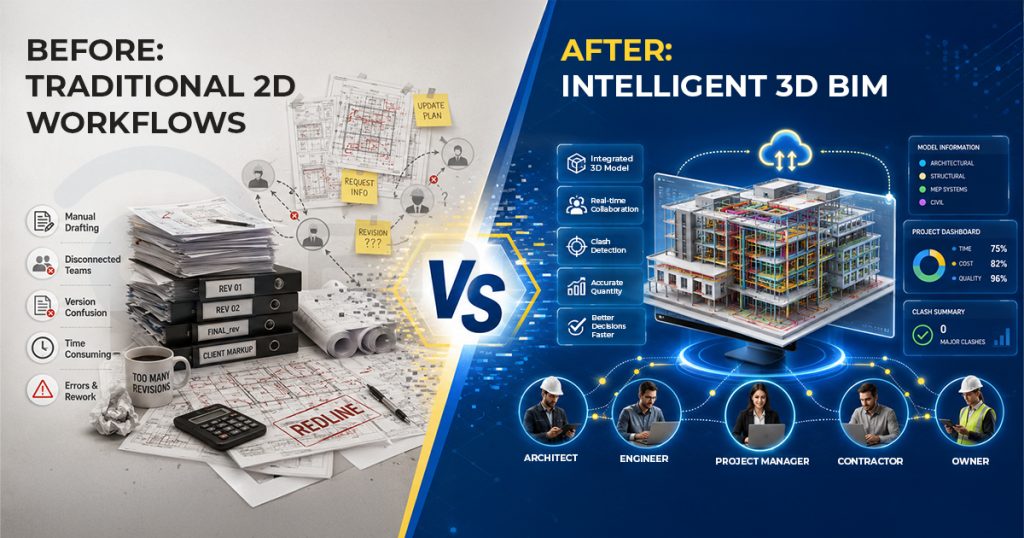
Gone are the days when AEC project teams relied on huge rolls of paper and 2D drawings carried in a long cylindrical-shaped container called a “drawing tube.” It often led to “costly misinterpretations” due to damaged sheets, rework, and schedule delays. The most expensive consequence, however, was an unhappy client whose project was not delivered on time.
Today, that “drawing tube” has given way to intelligent, data-rich 3D Building Information Modeling (BIM) environments. In short, BIM is all about creating a digital thread, turning ideas into a constructible reality.
Industry Insight: The construction industry is undergoing a transformative and decisive shift. As the Pinnacle Report points out, BIM adoption is on the rise in all economies globally, and the market is expected to grow to USD 23950 million by 2027.
What is BIM and Why Does Coordination Matter?
Building Information Modeling (BIM) is more than just geometry, material properties, schedules, and performance data rolled into a 3D model. Think of it as a live management tool for your entire project lifecycle, designed for collaboration and interoperability among diverse stakeholders.
BIM matters because poor coordination between different models (structural, architectural, and MEP) can trigger numerous RFIs, leaving workers idle but still on payroll while waiting for designs, approvals, and other clarifications.
BIM coordination in construction ensures:
- Architects, engineers, and contractors align early on a common model in real time, resulting in maximum utilization of the building space.
- Data silos disappear as disciplines converge into a single source of truth, improving accuracy.
- Errors are caught digitally, not physically on-site (Better to clash on a screen than on-site with steel and concrete)
- Accurate takeoffs from BIM translate into leaner procurement—less waste, lower costs, and smarter resource use
For C-level leaders, this means fewer disputes, smoother procurement, and predictable delivery outcomes. The end result: happy clients.
The BIM Coordination Workflow: Step-by-Step
A structured BIM coordination process minimizes risks and sets the foundation for success. Let’s break it down:
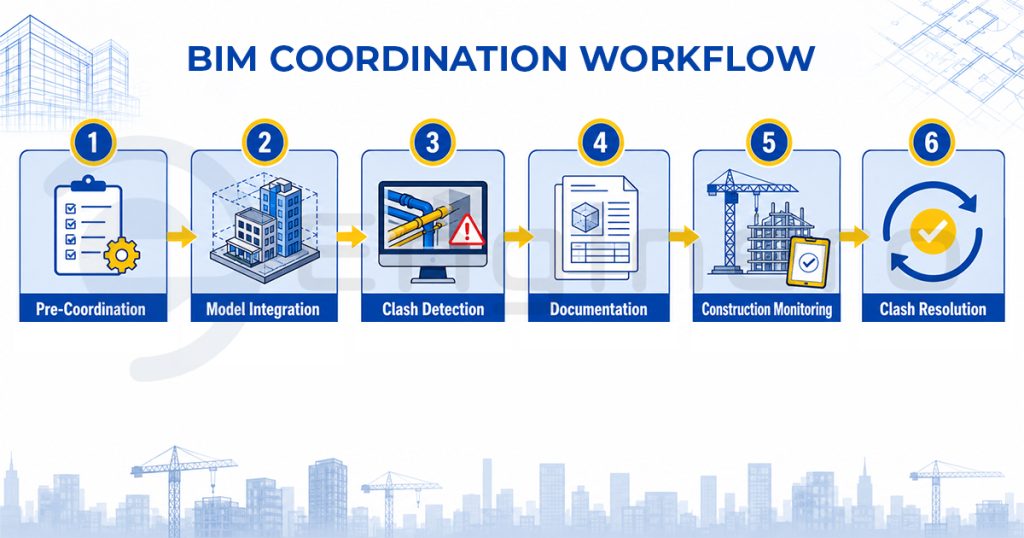
- Pre-coordination & Model Preparation
Pre-coordination between each discipline can help in proper identification of prefabrication opportunities, the correct estimation of material quantities, and the confident coordination of the MEP environment. This simplifies the identification and resolution of design issues and makes it easier to optimize contract schedules.
Example: An MEP team creates ductwork models at LOD 300 using the same file naming conventions as the structural team, ensuring the models align correctly when merged.
- Model Integration
When individual models merge into a federated model, silos disappear and integration begins. This is where misalignments become impossible to ignore
Example: When the architect’s wall model is merged with the structural engineer’s column model, a misalignment in grid placement is immediately visible in the federated environment.
- Clash Detection
Using tools such as Navisworks or BIMcollab, teams scan the federated model for clashes, pinpointing overlaps faster.
Example: Clash detection highlights that a sprinkler pipe passes directly through a structural beam on the third floor, a conflict that would have been costly to fix on-site.
- Clash Resolution
Rather than stumbling over conflicts on-site, teams eliminate them in the digital space.
Example: The MEP engineer reroutes the sprinkler pipe above the beam, and the architect adjusts the ceiling height to accommodate the new path; all before a single dollar is wasted in the field.
- Documentation & Communication
Decisions don’t vanish into email chains; every resolution is logged in a Common Data Environment or tracked via BCF files, with full transparency and accountability.
Example: A clash issue logged in the CDE is assigned to the MEP engineer with a deadline, so the project manager can track responsibility and progress in real time.
- Construction Monitoring & Updates
Coordination doesn’t stop at design; it evolves on site into the construction stage, where models are updated with as-built conditions, schedules, and progress tracking.
Example: During construction, the contractor updates the BIM model with the actual installed location of electrical panels, ensuring the digital twin matches on-site reality for facility management.
Tools and Platforms for BIM Coordination
It wouldn’t be inaccurate to say that the success of BIM project coordination solely depends heavily on the right platforms. In fact, if the platform is easy to use, reliable, and supports good teamwork, then your workforce will accept it with open arms. People work together more effectively, make faster collective decisions, and deliver better outcomes with fewer errors and delays. And that’s the point, isn’t it?
Common Data Environment (CDE):
- Definition and Purpose: A CDE is a secure, cloud-based workspace designed for effective collaboration across project teams, providing a centralized hub for construction project management.
- Centralized Repository: Platforms like Enginero offer a single location where models, documents, and issue tracking from all project aspects are stored and made accessible to authorized participants.
- Role-Based Access Control: Not everyone has default access to all information – access levels depend on each participant’s specific role, authorization level, and contractual responsibilities within the project.
- Security Protocols: True CDEs employ rigorous security measures, including mandatory two-step verification processes to ensure data safety and prevent unauthorized access.
- Data Protection: The system safeguards data ownership with protections that prevent alteration or deletion of critical information during the project’s lifetime.
- Efficiency Benefits: CDEs reduce time and effort by minimizing the need for repeated meetings focused on reviews, revisions, and back-and-forth Request For Information (RFI) processes.
- Standardized Operations: A neutral and secure CDE operates through common standards, codes, and values where issues are systematically recorded, distributed, and resolved without leaving anything unaddressed.
Unlike basic file-sharing platforms, Enginero’s CDE maintains complete model version history with automatic conflict resolution, ensuring teams always work from the latest coordinated model
- Clash Detection and Coordination Tools: Tools like Navisworks, BIMcollab and IntelliClash are widely used in platforms like Enginero to manage clashes and streamline decision-making. Some executives believe that you just have to export to clash detection software and all the clashes are automatically fixed, and nothing clashes anymore. In reality, we need AEC professionals to identify the ones that affect constructability or design coordination, simply because not all clashes are “relevant” to be resolved.
- IntelliClash uses AI algorithms to distinguish between critical structural conflicts and minor cosmetic overlaps, reducing review time by up to 70%
Best Practices for a Successful BIM Coordination Workflow
As discussed earlier, tools and platforms alone will not suffice. To maximize returns from 3D BIM coordination in projects, organizations must go beyond tools and invest in process discipline:
- Establish a BIM Execution Plan (BEP): There is no one universally accepted BIM model; it changes according to the dynamics of the project, and that’s where BEP steps in. BEP helps to define roles, responsibilities, and deliverables upfront.
- Standardize Formats and Conventions: Ensure consistency in model structures, location, file naming, avoidance of duplicate objects, correct IFC attribute mapping, Level of Development (LOD) requirements, coordinate systems, etc., to prevent integration conflicts.
- Schedule Regular Coordination Meetings: Frequent touchpoints keep teams aligned and responsive. Leverage cloud-based platforms like Enginero for real-time clash detection reviews.
- Use BCF/IDS for Issue Management: Structured issue tracking enhances accountability. Utilize AI-powered clash detection in tools like IntelliClash from Enginero to prioritize critical conflicts and automate routine quality assurance tasks.
- Invest in Training: Equip teams with skills in both tools and collaborative workflows. Train your team members in lean construction methodologies and provide certification programs in BIM.
Challenges and How to Overcome Them
Despite its advantages, BIM coordination challenges persist:
- Data Interoperability Issues: Different software ecosystems can create compatibility hurdles.
- Solution: Mandating open formats like IFC improves interoperability.
- Resistance to Change: Teams familiar with 2D workflows may resist BIM adoption.
- Solution: Executive sponsorship and targeted training are critical.
- Complex Models: Large projects generate heavy models that are difficult to manage.
- Solution: Use model segmentation and cloud storage to optimize performance.
- Distributed Teams: Coordination across multiple geographies can create delays.
- Solution: Cloud-based collaboration platforms ensure real-time alignment.
How BIM Coordination Workflow is Achieved in Enginero
- Centralized Model Environment:
All discipline models (architectural, structural, MEP) are uploaded into Enginero’s Model Viewer for seamless visualization and cross-model comparison.
Example: The structural and MEP teams can open a combined 3D model to verify beam and duct placements before construction begins.

- Automated Clash Detection:
The Clash Detection module identifies design conflicts using geometric and rule-based analysis. Clashes are grouped, prioritized, and categorized by type or severity.
Example: The system highlights HVAC ducts intersecting with electrical conduits, automatically tagging them as “High Priority – Critical Clash.”

- Streamlined Issue Management:
Detected clashes are instantly converted into actionable items through the Issue Tracker, where they can be assigned, monitored, and resolved within the same platform.
Example: A detected clash is assigned to the MEP engineer with a due date and tracked until the revised model is uploaded and verified.

- Integrated Communication:
Coordination discussions, markups, and RFIs are connected directly to model elements, ensuring decisions are recorded and easily traceable.
Example: The design lead comments on a clash in the model, and the linked RFI automatically updates the discussion thread for all team members.
- Connected Modules:
Enginero links Model Viewer, Issue Tracker, Task Manager, and RFI workflows, maintaining one consistent project environment across all stakeholders.
Example: When an issue is resolved in the Issue Tracker, it automatically updates the task status in the Task Manager and syncs with the model view.
How the Workflow Can Be Enhanced
- Introduce AI-powered clash grouping and prioritization to focus on high-impact issues.
- Enable real-time mobile and offline access for on-site coordination and instant updates.
- Establish standardized modeling protocols (naming conventions, LOD, tolerances) for consistency across teams.
- Use analytics and dashboards to track recurring clash types, response times, and coordination performance.
With these enhancements, Enginero evolves from a coordination tool into a predictive, insight-driven BIM collaboration platform.
The Cost of Inaction – Why BIM Coordination Matters to Your Bottom Line
- Losing 15-25% to avoidable rework and clashes.
- Missing project deadlines by 20-30% due to coordination delays.
- Bleeding profits on change orders.
- Facing obsolete operations while competitors leverage digital twins.
- Losing major contracts as clients mandate BIM capabilities.
Conclusion
The BIM coordination workflow is a critical data synchronization system in modern construction. At its core, it ensures model consistency across multiple disciplines—a task that can quickly descend into chaos without it, due to complex and siloed design and construction processes.
For C-level leaders, the takeaway is clear: investing in structured BIM coordination—backed by the right tools, platforms, and best practices—is essential for delivering competitive, future-ready projects.
Enginero’s integrated platform eliminates the coordination chaos:
- AI-powered IntelliClash prioritizes critical conflicts automatically
- Secure Common Data Environment keeps teams aligned in real-time
- Complete project lifecycle management from design through construction
Transform your coordination workflow in 30 days or less.
Frequently Asked Question About BIM Coordination Workflow
What is BIM Coordination in Construction?
It’s the process of integrating and aligning design models across disciplines, like laying the foundation before raising the structure, ensuring everything above stands strong and aligned.
What are the main steps in BIM Coordination?
Model preparation, model integration, clash detection, clash resolution, documentation, and construction monitoring; it is like assembling scaffolding before pouring concrete.
Why is BIM Coordination important from design to Construction?
It ensures smooth transitions, reduces risks, and improves cost and schedule predictability, like aligning every brick before laying the next one.
Which tools are used for BIM Coordination?
Navisworks, BIMcollab, and CDE platforms like Enginero.
Leave a Reply