While working on BIM projects, especially using the Revit application, everyone just focuses on the goal, what needs to be prepared/modeled, various design techniques, and technical parameters. But to complete all those tasks effectively and ensure all goes well, there is a key entity: collaboration.
BIM modeling is successful only through a collaborative approach among teams. In BIM processes, various teams, architects, MEP designers, interior designers, and many more participate in producing a whole building with all detailed aspects. To keep every team from any corner of the world on track, collaboration plays a key role.
Achieving collaboration is not a strenuous task. It can be achieved through various BIM collaboration and project management tools. But managing those tasks along with maintaining the allocated time, costs, and budget brings a significant impact on the managers. BIM projects are effectively optimized when collaboration metrics have been clearly defined and maintained.
BIM project metrics or simply collaboration metrics help project heads to make prompt decisions for the project’s success, and also help project managers/leads to take timely actions to ensure the project flows smoothly with no delays and misruns.
Revit Cloud Work-sharing
Revit has a feature to work in a collaborative way, where users from different machines and locations can work on a Revit project remotely. This is typically enabled through a cloud environment, most commonly by using Autodesk’s BIM Collaborate within the Autodesk Construction Cloud (ACC), which is a popular choice. Enginero’s Revit Cloud Collaboration also provides strong cloud-based collaboration capabilities, giving users additional options to suit their needs.
Team members, from every corner of the world, can collaboratively work on the project. This cloud platform consists of work shared models, versions, and coordinated spaces. This distributed architecture helps speed up decision-making and boosts transparency.
However, the performance is decided by how well the system is managed, whether the progress is tracked properly, task allocation, and accountability. These aspects need to be managed; to do this, a tracking system or a system that tracks the performance of the whole BIM system is necessary.
Need for Collaboration Metrics
Collaboration could be a boon when dealing with many teams and stakeholders, but also a troublesome element if not managed well. Communication errors, irregular feedback, delays, change management, and budget issues may occur when collaboration is mismanaged.
To tackle this, collaboration metrics help you a lot. Here are the following ways in which collaboration metrics significantly benefit teams,
- Improve team efficiency and responsiveness
- Reduced bottlenecks and delays
- Early detection of workflow issues
- Improved accountability and transparency
- Data-driven coordination and insights
- Enhanced client-stakeholder communication
- Continuous development and better management to change
Metrics also help project heads and managers to take necessary, crucial decisions, and in recent days, data speaks louder than words, which ultimately contributes positively to improving project outcomes, particularly in financial aspects.
Key Collaboration Metrics in Revit Cloud Projects
Not every project metric is important; the goal here is to track actionable insights from the project, the metrics that help in enhancing collaboration and guide you in making decisions.
Here is a complete breakdown of all the key collaboration metrics that need to be tracked.
Work-sharing activity and conflicts
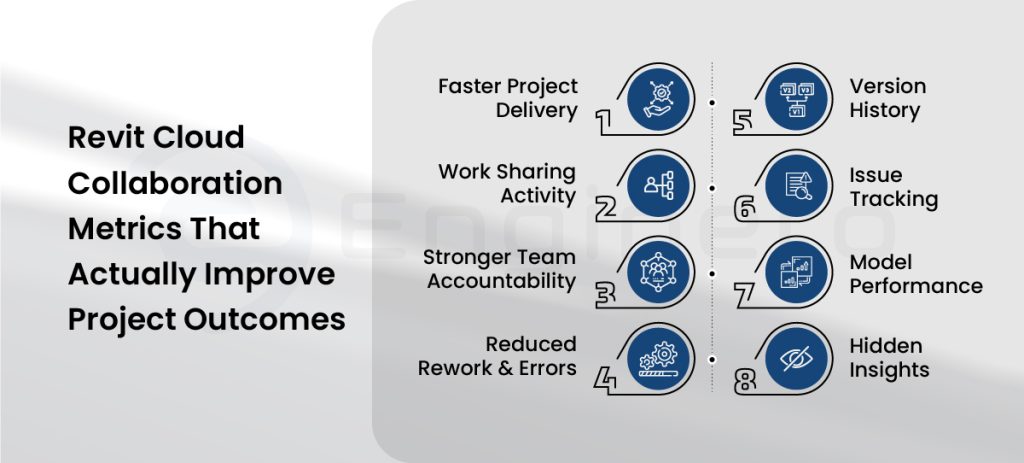
Track the work allocation to each user, the time taken to finish, conflicts produced, along the reason.
Backlogs and discrepancies are faced by each user. Find out accessibility issues, metrics regarding the bottlenecks that slow down the workflows. Excessive conflicts will reduce model quality, which affects the project’s eminence. Early resolution of the quality-related issues will help move the process smoothly.
User participation and accountability
Maintain a logbook of user details who work on specific projects, active/inactive hours, collaborative sessions, duration for issue resolution, which helps in assuring accountability, finding out productivity, and helps project managers to find out user engagement in each activity.
Version history
Track the frequency of model publication, the time consumed to create a new version, or to resolve certain issues. Also, it is crucial to keep a record of all the rollbacks that occurred during the workflow.
These metrics indicate whether the teams are properly producing the latest versions, ensuring transparency in the projects. Rollback tracking plays a key role in quality, too; many rollbacks affect workflows, leading to ambiguities in the work-sharing process.
Model performance
Model size and warnings affect the performance. Track the model growth and size as the project progresses. Uncontrolled growth of models raises conflicts in loading, leads to system clashes, and performance-related issues.
For every iteration, track all the model warnings. Too many warnings affect the model for further development and degrade the quality, ultimately affecting user experience.
Issue tracking and resolution
Track every issue, whether it is related to the model’s performance or workflow. Issues detected, average issue resolution time, open/closed issues, and a dashboard displaying all issue metrics. This helps in identifying the areas of improvement, helping project managers to discuss potential solutions to improve and prioritize.
Hidden insights
Some metrics are not directly involved in Revit projects or designs, but they influence the performance. These metrics could be about working conditions, system performance, personnel training, and unbalanced work timings.
These metrics impact the working conditions and project quality indirectly, yet they need to be tracked and fixed efficiently.
Tools and Techniques for Tracking Metrics
With the evolution of AI and analytics, tracking the collaboration metrics has become easier. There are dedicated tools and project management software that also help you in tracking these insights in your Revit projects. Let us have a look at them,
BIM 360/ACC Insight Dashboards
Autodesk provides its metrics tracking tool within Autodesk Collaborate. Revit users maintaining their models within the ACC cloud can obtain these insights in a comprehensive dashboard and detailed metrics.
These dashboards include,
- Total number of syncs with central models
- Frequency of model publication
- An activity Log of the user
- Model management and issue tracking
With these tools, BIM managers can keep an eye on the team members, their engagement with the model, pinpoint patterns of inactivity, and uncover trends that might suggest collaboration issues.
Data visualization applications
Exporting the data from Revit or the ACC cloud to visualization applications like Power BI or Tableau helps you create interactive and real-time dashboards. This integration offers a more tailored and detailed look at project metrics, customized to meet your specific needs. With these tools at your disposal, you can create thorough and personalized reports and dashboards that really boost decision-making and project management.
Design management tools
Construction design and project management platforms play a critical role in enhancing collaboration. These tools also provide metrics that help you make necessary decisions with accurate data.
Platforms like Enginero provide various projects and model insights within their platform by integrating Revit and its projects directly through its plugins, and provide a cloud-based repository to maintain and manage the models along with their metrics.
Model coordination applications
Coordination and clash-detecting applications like Autodesk’s Navisworks or Enginero’s IntelliClash TM create coordination sets between different models and aid you in detecting clashes between them. These tools automatically track the number of issues generated. By integrating these tools with any project management software, you can effectively monitor the status of active and closed issues, resolution times, and identify the models or teams that produce recurring problems.
Empower Collaboration Metrics with Enginero!
While Revit provides powerful BIM modeling and platforms like ACC/BIM 360 provide comprehensive model management and metric tracking, Enginero complements this process by transforming collaboration metrics into deeper insights by integrating various CAD models and BIM projects into one central repository, reducing inconsistency, and improving collaboration in the construction and BIM projects.
Enginero provides a package of different tools and features to enhance collaboration and coordination between stakeholders and improve productivity.
Interactive Dashboards for Every Project
Enginero integrates and aggregates important metrics from your Revit cloud projects into a single unified dashboard. It sheds light on:
- Active users and how engaged teams are
- What frequent synchronizations and publications happen
- Coordination activities from multiple disciplines
It provides essential insights into your project and leads to model interactions of teams in real-time, saving advanced model comparison from multiple sources.
Intelligent Alerts and Notifications
Enginero monitors and analyzes project data, enabling your project team to be notified of the respective project users and the managers when any action takes place, leaving everyone notified and maintaining transparency.
Notifications regarding,
- Model publication
- When an Issue or RFI is created
- User gets assigned to a project/task
These alerts are notified through emails or notifications under the Enginero project. Notifications keep your project team informed as the project progresses, enabling them to take the appropriate action to keep the project moving forward.
Integration with Existing Tools
Enginero brings all your project models under one roof; it could be from any CAD application: SolidWorks, Autodesk, Tekla, Revit, Civil 3D, and many more.
Enginero also integrates with BIM 360/ACC, enabling users to manage their native data for clash detection and design management, maintaining their current processes.
Role-Based Access and Collaboration Tracking
Enginero uses role-based permissions so that each participant, including BIM managers and project heads, can view the collaboration data that applies to their job. This increases openness and ensures teams concentrate on their priorities.
Also, the project managers can assign only respective roles in order to maintain consistency and reduce confusion while managing various project data.
Conclusion
Collaboration is the backbone of successful BIM projects, especially when working with Revit in a cloud environment. Tracking collaboration metrics, like user activity, issue resolution, model performance, and version history, not only boosts team efficiency and accountability but also ensures smoother workflows and higher model quality.
Tools like Autodesk BIM Collaborate and Enginero provide powerful dashboards, intelligent alerts, and integration capabilities that turn raw data into actionable insights, helping teams stay aligned and productive throughout the project lifecycle.
Ready to take your BIM collaboration to the next level? Start tracking the right metrics with Enginero and transform your Revit cloud projects into efficient, data-driven success stories.
Streamline teamwork, enhance transparency, and deliver better buildings faster
Leave a Reply